









TL;DR
The best tech gift isn't the most expensive one - it's the one that requires the least instruction.
Here's what matters:
- Simplicity is king: If it comes with a 50-page manual, walk away.
- Setup is part of the gift: The real magic happens when you unbox it, connect to Wi-Fi, set up contacts, and add photos before wrapping.
- Zero interaction beats high interaction: Auto-updating photo frames trump new smartphones every time.
Why "Easy to Use" Matters More Than "High Tech"
Many seniors aren't afraid of technology because they lack intelligence. Modern interfaces just weren't built for them. Small text. Gesture controls that require precise finger movements. Updates that change everything overnight.
Research shows that usability - not flashy features - is what determines whether seniors adopt new technology. A device with three giant buttons that works beats a sleek touchscreen that confuses.
Your grandparent might've run a business, raised a family, and mastered skills you'll never have. But an iPhone with 47 swipe gestures? That's a different beast.
The 3 Best Categories of User-Friendly Tech Gifts
Here are three kinds of gadgets that actually help seniors. We grouped them by what matters: staying connected, keeping safe, and having fun.
Connection tools make it simple to talk with family. Think of big-button phones or tablets that let you video call with one tap. No complicated menus, just a way to see a grandkid’s face.
Health & Safety devices focus on peace of mind. Automatic pill dispensers sort medication and alert you when it’s time. Medical alert systems let you call for help if you fall, even if you can’t reach a phone.
Entertainment gadgets are for enjoyment. Simple e-readers with adjustable text let you read without straining your eyes. Easy-to-use music players can store favorite old songs.
1. Gifts That Keep Them Connected (Combating Loneliness)
Isolation is the silent killer of golden years. The best tech gifts bridge distance without requiring a PhD.
GrandPad Tablet
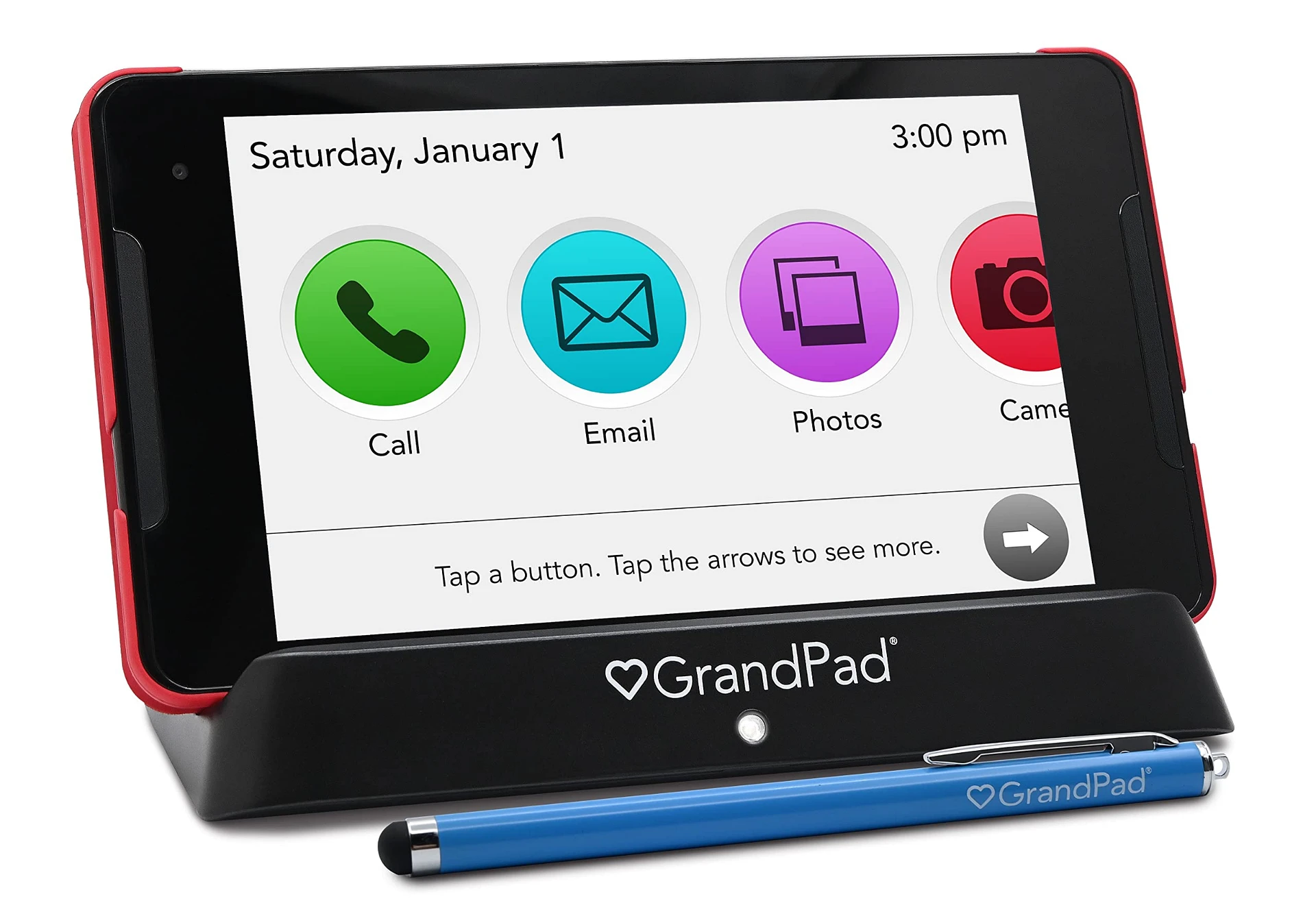
This isn't another tablet. It's a tablet purpose-built for seniors. Comes with a stylus, zero pop-up ads, no confusing app store, and includes 4G LTE - meaning it works without home Wi-Fi. Family members manage everything remotely via a companion app.
If your grandparent has ever thrown an iPad across the room (we've all been there), the GrandPad is your answer. The charger is just called "the charger." No USB-C vs. Lightning nonsense.
Why it works:
- Large icons
- No accidental purchases
- Video calling with one tap
- Family can upload photos remotely
2. Gifts That Offer Peace of Mind (Health & Safety)
These devices work passively in the background. No fiddling required.
Amazon Echo Show (with Customizable Routines)

Typing can be a pain. Voice control skips all that. With permission, you can set up "Drop In" for a video call - no one has to press "answer."
Someone wakes up, and family photos start appearing on the screen. Alexa might give the weather forecast and mention it's time for vitamins. A simple "good morning" or a motion sensor can make it all happen automatically.
Other smart health options:
- Medication dispensers that alert family if doses are missed
- Voice-activated emergency calls
- Fall detection sensors (without bulky wearables)
3. Gifts That Spark Joy (Entertainment & Memory)
Tech should enrich daily life, not feel like homework.
Aura or Skylight Digital Picture Frame

These frames receive photos via Wi-Fi. Once you set it up, your grandparents never lift a finger. New pictures from grandkids appear automatically on a high-resolution screen. No syncing, no cables, no confusion.
This isn't a gift that makes them stare at another screen. It turns their living room into a constantly updating gallery of memories. And honestly? That's pretty damn beautiful.
Tech Gifts to Avoid (And What to Buy Instead)
Let's be real for a second. Some gifts are just bad ideas, no matter how good the sale price looks.
Skip these:
- Refurbished old smartphones (battery dies fast, and that's a nightmare for seniors)
- Cheap smartwatches with 15 apps to configure
- Devices that only work via mobile app controls
Buy instead:
- Devices with physical buttons
- Clear voice UI options
- Products specifically marketed as gifts for elderly parents who have everything (they usually nail the usability part)
The "Unwrapping" Guide: How to Give a Tech Gift the Right Way
The gift is 50% hardware and 50% setup assistance. Period.
Before you wrap it:
- Charge it fully
- Connect to Wi-Fi
- Set up accounts and passwords
- Add contacts with photos
- Test everything twice
Include a physical cheat sheet:
Write instructions on a card: "Press the blue button to see the grandkids." Tape it to the device if needed. No shame in that.
Schedule a follow-up call:
Plan a "practice session" the next day. Walk them through it again. Repetition builds confidence.
FAQ
My grandparent has dementia. Is tech still a good gift?
Yes, but choose carefully. Focus on sensory experiences like digital photo frames for reminiscence or simple music players. Avoid anything requiring new learning - it can cause frustration instead of joy.
What if they don't have Wi-Fi?
Many modern devices (like GrandPad) offer built-in cellular plans. Alternatively, consider gifting a mesh Wi-Fi system along with the main gift. Strong connectivity throughout the house makes everything else work better.
How do I manage passwords for them?
Use a family password manager if they're tech-savvy enough. If not, write everything down in a designated "Tech Notebook" kept by their favorite chair. For streaming services, enable "Remember Me" and set devices to auto-login. Security matters, but so does usability.